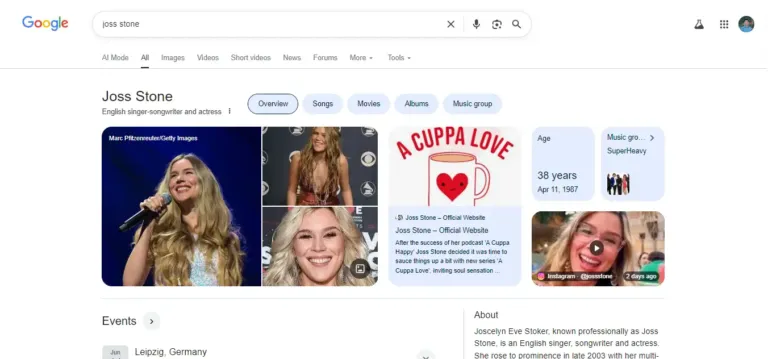
Every person, company and book that Google understands as an “entity” has an ID in the Google Knowledge Graph. That ID is called the kgmid (Knowledge Graph machine ID). If you have a Knowledge Panel, you have a kgmid, and knowing it makes almost every part of entity SEO easier.
In this guide I will show you four ways to find it, how to read it, and what to do with it once you have it.
What a kgmid looks like
A kgmid is a short code that starts with either /m/ or /g/:
- /m/ IDs are older. They come from Freebase, the database Google acquired and later folded into the Knowledge Graph. Long-established people, places and brands often have one.
- /g/ IDs are newer. Most people and companies that got a Knowledge Panel in recent years have a /g/ ID, such as /g/11nt_62t6h.
You can open any entity directly by putting its ID into a search URL: https://www.google.com/search?kgmid=/g/11nt_62t6h. That link always opens the panel for that exact entity, even if a normal search for the name shows something else.
Method 1: The Share button on your Knowledge Panel
This is the fastest way and works on desktop and mobile.
- Search for your name on Google until your Knowledge Panel appears.
- Click the three-dot menu next to your name at the top of the panel and choose Share.
- Copy the link and open it in a new tab.
- Look at the address bar. The part after kgmid= and before the next & is your ID.
If the ID looks like %2Fg%2F11nt_62t6h, it is URL-encoded. Replace %2F with a forward slash and you get /g/11nt_62t6h.
Method 2: The Knowledge Graph Search API
Google offers a free Knowledge Graph Search API through Google Cloud. After you enable it and create an API key, you can query a name and the response lists matching entities with IDs in the form kg:/g/… or kg:/m/….
This is useful when you manage many entities, for example a list of clients. Keep in mind that the API does not always return every entity, especially newer person entities, so a missing result does not mean you have no panel.
Method 3: Wikidata
If you have a Wikidata item, open it and look for the property Google Knowledge Graph ID (P2671), or Freebase ID (P646) for older /m/ IDs. Many well-known entities have these filled in. If yours is missing and your Wikidata item is solid, adding the ID with a reference is a good way to connect the two databases.
Method 4: The page source of your search results
Search your name, open the page source of the results page (Ctrl+U in most desktop browsers), and search for “/g/”. The IDs that appear near your Knowledge Panel are usually the right ones. This method is less reliable than the Share button, because results pages also contain IDs for related entities, but it is handy when the Share option does not show.
Why your kgmid matters
Once you know your ID, you can use it in four practical ways.
Add it to your Person schema
On your entity home (usually your own website), your Person schema can name the Knowledge Graph entity it describes. I add the panel URL to sameAs and the ID itself as an identifier. This tells search engines, in plain structured data, that your website and that Knowledge Graph entity are the same person.
Spot duplicate panels
Many people have more than one entity without knowing it. I have three myself: two “SEO specialist” entities and one “Author” entity that Google created from my books on Google Books. If a search for your name sometimes shows a different panel, check the kgmid each time. Different IDs mean different entities, and that is a problem worth fixing.
Track changes over time
Panels change. Photos appear, facts get added, the subtitle shifts. Saving your kgmid link and checking it once a month gives you a clean record of what Google shows for your exact entity, regardless of personalization in normal searches.
Talk to Google precisely
When you send feedback or work with someone on your panel, the kgmid removes all doubt about which entity you mean. This matters a lot if other people share your name.
Common questions
Does everyone have a kgmid?
No. You only have one if Google has created an entity for you. Many people have an entity before they have a visible Knowledge Panel, but if nothing appears for your name and none of the methods above find an ID, you probably do not have one yet.
Can my kgmid change?
The ID of an entity stays the same. What can change is which entity Google shows for your name. When Google merges duplicates, one ID usually becomes the main one and the others stop appearing.
Is it safe to share my kgmid?
Yes. It is a public identifier, like a profile URL. Anyone can open it.
Want to know where you stand?
If you are a founder, executive or professional and want an accurate Google Knowledge Panel, I can review your current search presence and tell you honestly whether you qualify. Request a free eligibility check or read more about my Google Knowledge Panel service.